Dot file configs are sacred to engineers. I'm going to explore some of my shell plugins, configs and tweaks that, I think, creates a beautiful and productive experience.
Core shell
At the core I use zsh with oh-my-zsh. I know, I know, there are concerns around performance and slow loading, but to be honest my setup has never gotten to the point of shell bloat annoyance and I think a lot of the buzz is really premature optimization. Fish is great, but being posix-compliant is big, although plugins have standardized and feel similar at this point.
Prompt theme
Winner: Spaceship
Spaceship is a context-aware prompt that only shows what matters where you're standing. In a node project you get the node version, in python you get python, when AWS credentials are loaded you get the profile. Git status (branch, dirty state, ahead/behind) is always there in a repo. Nothing else clutters the line.
ZSH_THEME="spaceship"The Nerd Font glyphs from the Ghostty section below are what render the icons. Without a Nerd Font you'll see tofu where the branch and language symbols should be.
Plugins
plugins=(git node aws docker npm macos sudo fzf zsh-syntax-highlighting zsh-autosuggestions)A handful of these earn their keep daily:
| Plugin | Description | Notable Aliases/Features |
|---|---|---|
git | Aliases for faster git commands. | gst (status), gco (checkout), gcm (commit -m), gp (push), gl (pull) |
zsh-syntax-highlighting | Highlights commands: green if valid on PATH, red if invalid, catching typos before pressing enter. | — |
zsh-autosuggestions | Shows suggestions from history as gray ghost text. Right arrow accepts the suggestion. | — |
fzf | Wires the keybindings for efficient fuzzy finding. Atuin takes over Ctrl+R, but Ctrl+T (files) and Alt+C (cd) use fzf. | Ctrl+T (files), Alt+C (cd) |
sudo | Double-tap Escape to prepend sudo to the current command line. | — |
macos | Adds helpers for macOS workflows. | ofd (open Finder), tab (new terminal tab), pfd (print Finder path) |
aws, docker, node, npm | Tab completion and small helpers for various tools. asp <profile> from aws is especially useful. | asp <profile> (AWS) |
Terminal mac apps
Winner: cmux
We're going through a bit of a renaissance in terminal options: AI-forward choices like Warp, beautiful emulators like Ghostty, and vibe coding tools like Conductor are all changing what the terminal can be. Where I landed was cmux and its essentially Ghostty++ with a vertical tab first approach, integrated browser and other niceities targeting at vibe coding or AI harness usage.
I was big on Warp initially, but found its native AI tooling lacking compared to the performance of Claude Code and the ai-forward nature would actually get in the way of normal terminal usage. Ghostty is still great, but cmux just adds some features. On Windows, I used Warp for a while, but went back to the Terminal application.
Finding things
Winner: fzf
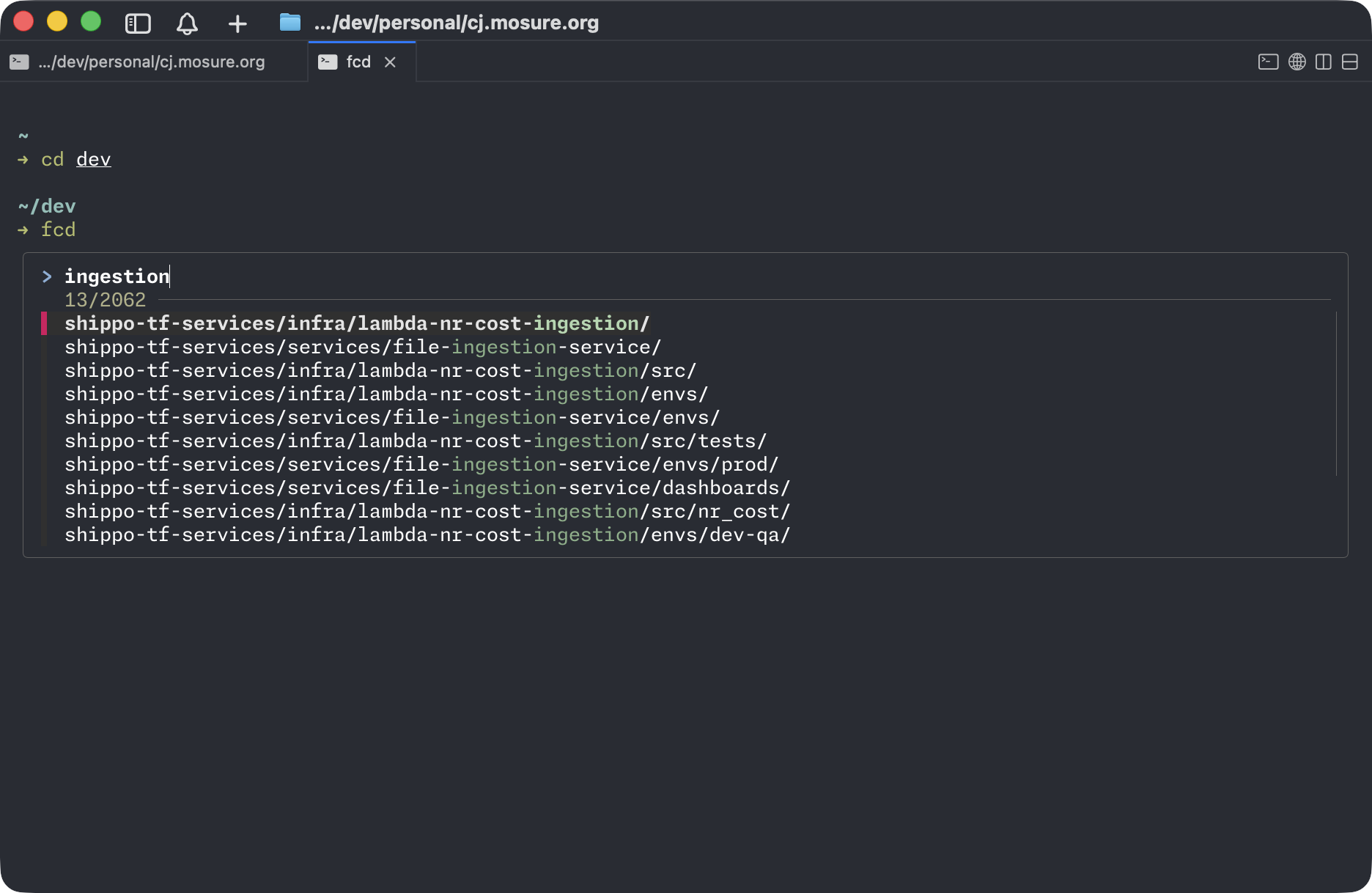
Fzf provides a great experience in fuzzy finding across a ton of functions and tools. It makes finding directories, files, content, services, etc all easier with a better ux.
Here is a basic example for a fuzzy cd command that allows fuzzy search on any child directory (cd "$(fd --type d --hidden --exclude .git | fzf)" or I map to a fcd alias):
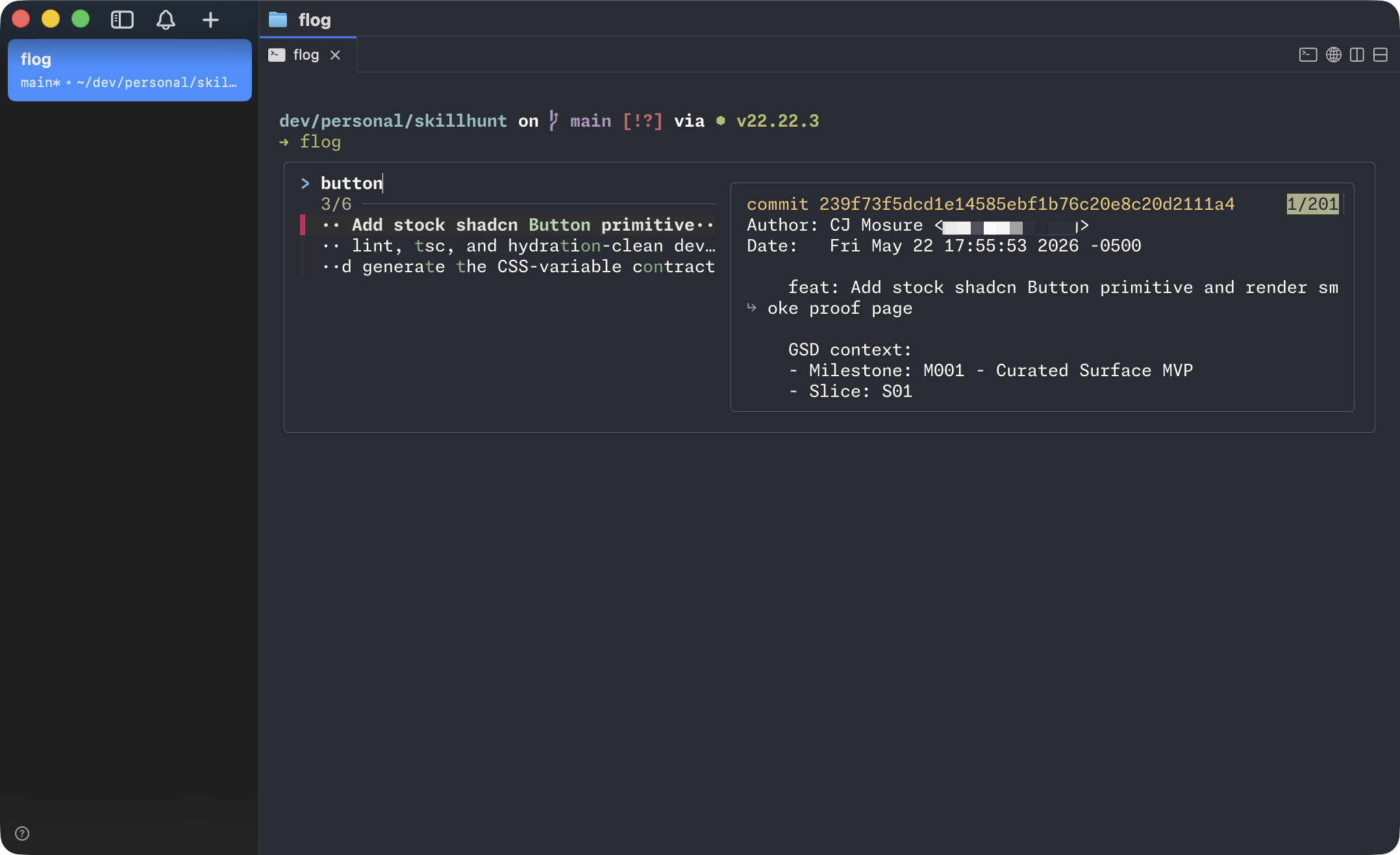
For an example of fuzzy search for git logs:
There are a ton of application for this, fuzzy search through:
- logs
- environment variables
- git logs, branches, commits, tags
- file content
- kubectl pod logs
- most anything else that can be piped
Here is a start list of my aliases and functions, the primary pattern is just add f in front of standard commands:
# FZF

# Defaults apply to all fzf commands
export FZF_DEFAULT_OPTS="
  --height 40%
  --layout=reverse
  --border
  --preview-window=right:60%:wrap
  --bind 'ctrl-y:execute-silent(echo -n {} | pbcopy)+abort'
  --bind 'ctrl-/:toggle-preview'
"
# Use fd instead of find (respects .gitignore)
export FZF_DEFAULT_COMMAND='fd --type f --hidden --follow --exclude .git'
export FZF_CTRL_T_COMMAND="$FZF_DEFAULT_COMMAND"
export FZF_ALT_C_COMMAND='fd --type d --hidden --follow --exclude .git'
# Previews for Ctrl-T and Alt-C
export FZF_CTRL_T_OPTS="--preview 'bat --color=always --line-range :500 {}'"
export FZF_ALT_C_OPTS="--preview 'eza --tree --color=always {} | head -200'"
# Fuzzy cd
alias fcd='cd "$(fd --type d --hidden --exclude .git | fzf)"'
# Open file in editor
alias fe='${EDITOR:-vim} "$(fzf --preview '\''bat --color=always {}'\'')"'
# Open multiple files in editor (Tab to multi-select)
alias fem='${EDITOR:-vim} $(fzf -m --preview "bat --color=always {}")'
# Preview-only file browser
alias fp='fzf --preview "bat --color=always {}"'
# Fuzzy branch checkout (local + remote)
alias fco='git checkout "$(git branch -a | sed "s/^[* ]*//;s|remotes/origin/||" | sort -u | fzf)"'
# Fuzzy log browser
alias flog='git log --oneline --color=always | fzf --ansi --preview "git show --color=always {1}"'
# Fuzzy add (multi-select)
alias fadd='git status -s | fzf -m --preview "git diff --color=always {2}" | awk "{print \$2}" | xargs git add'
# Fuzzy stash pop
alias fstash='git stash list | fzf --preview "git stash show -p {1}" | cut -d: -f1 | xargs git stash pop'
# Fuzzy env var lookup
alias fenv='env | fzf'
# Fuzzy history (in addition to Ctrl-R)
alias fh='eval "$(history | fzf --tac | sed "s/ *[0-9]* *//")"'
# kubectl pod logs (follows)
fkl() {
  kubectl logs -f "$(kubectl get pods -o name | fzf)"
}
# Find-in-files with live preview, opens at the matched line a
fif() {
  local result
  result=$(rg --color=always --line-number --no-heading --smart-case "${1:-}" \
    | fzf --ansi --delimiter : \
          --preview 'bat --color=always {1} --highlight-line {2}' \
          --preview-window 'up,60%,border-bottom,+{2}+3/3')
  [ -n "$result" ] && ${EDITOR:-vim} "$(echo "$result" | cut -d: -f1)" \
    "+$(echo "$result" | cut -d: -f2)"
}
Better history
Winner: atuin
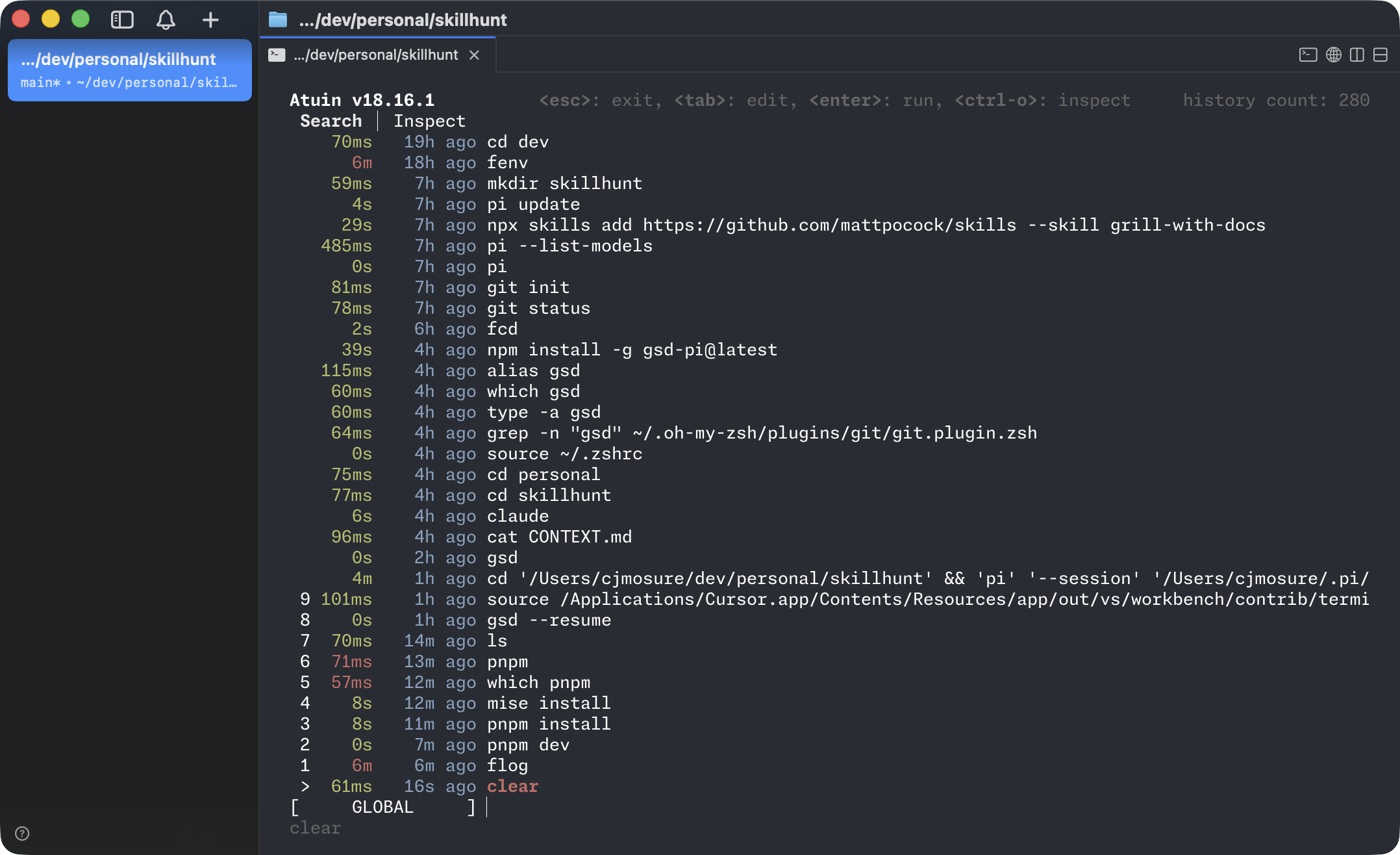
Atuin replaces up arrow or ctrl+r with a sql-lite backed searchable history and improved UX. I find myself reusing dash commands often so the expanded and accessible history is super useful!
Better cd
Winner: zoxide
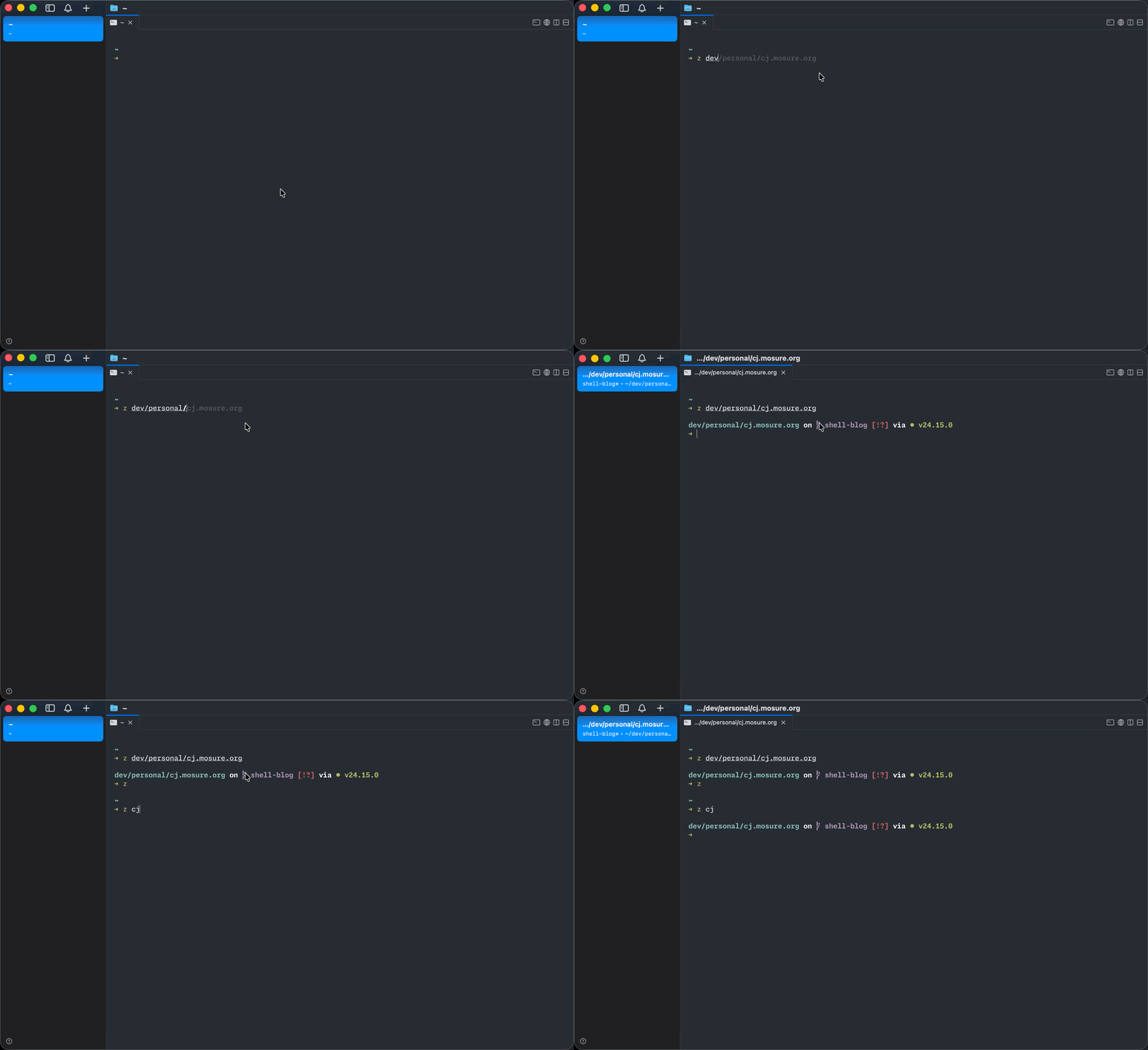
Zoxide remembers frequently cd'ed directories and provides a fuzzy or partial match to easily change directory. Its simple, but I find its saves a ton of time, especially in deeply nested projects.
Ditching nvm, pyenv, asdf, etc for mise
Winner: mise
Mise can manage versions and installs for all languages (js, python, go, ruby, and so on), its faster, has broader utility and I'm making a bet that this becomes the standard for most development environments.
I won't do a walkthrough of configuration and installation as you can reference their docs but I'll cover some basic use-cases to show the value:
You can run scripts at a certain version of a tool directly, which is convinent
mise exec node@26 -- node -vOr easily install globals:
mise use --global node@26Per-project configuration goes in mise.toml.
[tools]
node = "20"
python = "3.12"
go = "1.22"
Running mise install in that directory installs every pinned version. Switching directories switches runtimes. There's no nvm use, no per-shell shimming lag in the prompt, no separate workflow for each language.
Environment variable management
I previously used direnv for automatic env variable loading (export DATABASE_URL=... in .envrc.) but Mise handles environment variables well enough with automatic loading, for example:
# mise.toml
[env]
DATABASE_URL = "postgres://localhost/myapp_dev"
LOG_LEVEL = "debug"
PORT = "3000"
Or example of loading a .env file
[env]
_.file = ".env"
# or multiple, later wins
_.file = [".env", ".env.local"]
One additional plus I haven't had a use-case for is even path additions per directory:
[env]
_.path = ["./bin", "./node_modules/.bin", "./scripts"]
Or running a command to populate vars:
[env]
AWS_ACCOUNT_ID = "{{ exec(command='aws sts get-caller-identity --query Account --output text') }}"
GIT_BRANCH = "{{ exec(command='git rev-parse --abbrev-ref HEAD') }}"
Or source a shell script:
[env]
_.source = "./scripts/load-env.sh"
Tons of different options for flexibility. You can view their docs for more.
Odds and ends
| Tool | Replaces | Why |
|---|---|---|
eza | ls | Colors, icons, git status inline, tree mode |
bat | cat | Syntax highlighting, line numbers, git diff markers |
rg | grep | Fast, parallel, gitignore-aware by default |
fd | find | Sane defaults, intuitive syntax |
delta | git's pager | Side-by-side diffs, syntax highlighting |
dust | du | Visual tree of disk usage |
duf | df | Color-coded disk usage at a glance |
btop | htop | Better visualization, GPU monitoring |
The two aliases I find worth committing.
alias ls='eza --icons --git'
alias ll='eza --icons --git -lah'
I deliberately don't alias cat to bat. Aliasing cat breaks pipes and scripts in subtle ways, and explicit bat path/to/file is two extra keystrokes. The boundary between "interactive convenience" and "tool that needs to behave predictably anywhere" is worth respecting.
Ghostty customizations
Cmux reads Ghostty's config directly, so anything you'd put in ~/.config/ghostty/config works.
font-family = "MonaspiceNe Nerd Font"
font-size = 13

font-feature = calt
font-feature = liga
font-feature = ss01
font-feature = ss02
font-feature = ss03

theme = One Dark
window-padding-x = 12
window-padding-y = 8
cursor-style = bar
copy-on-select = clipboard
scrollback-limit = 100000000
The font is worth a second of attention. GitHub's Monaspace is five matched monospace fonts, and the one I use is Neon. Its trick is texture healing: small kerning adjustments that keep characters from looking awkward next to each other without breaking column alignment. The Nerd Font variants (which prefix the family name with "Monaspice", note the spelling) include the glyphs that context-aware prompts like Spaceship rely on.
brew install --cask font-monaspace-nerd-fontGit configs
[init]
    defaultBranch = main

[push]
    autoSetupRemote = true
    default = current

[pull]
    rebase = true

[fetch]
    prune = true

[merge]
    conflictStyle = zdiff3

[diff]
    algorithm = histogram
    colorMoved = default
    mnemonicPrefix = true
    renames = true

[rebase]
    autoSquash = true
    autoStash = true
    updateRefs = true

[rerere]
    enabled = true
    autoupdate = true

[branch]
    sort = -committerdate

[commit]
    verbose = true
merge.conflictStyle = zdiff3 (git 2.35+) shows the common ancestor inside conflict markers instead of only the two diverged sides, which makes most conflicts noticeably easier to resolve. rebase.updateRefs (git 2.38+) updates every branch in a stacked rebase, which is the difference between stacked PRs being painful and being routine. rerere remembers how you resolved a conflict and auto-replays it next time the same one appears. There's nothing quite like watching it silently resolve the same merge conflict for the third week running. push.autoSetupRemote is the one I miss most when working on a machine without it. First push of a new branch just works, no --set-upstream ceremony.
For the pager I use delta with side-by-side diffs and line numbers.
[core]
    pager = delta

[interactive]
    diffFilter = delta --color-only

[delta]
    navigate = true
    side-by-side = true
    line-numbers = true
And pushf = push --force-with-lease as an alias. --force-with-lease refuses to push if the remote moved since your last fetch, which protects teammates' work on shared branches. The day I started reaching for pushf instead of push --force was a small but real reduction in my background anxiety.
The last piece is a global gitignore. Things like .DS_Store, editor caches, and AI tooling state shouldn't have to be ignored per-repo.
git config --global core.excludesfile ~/.gitignore_globalWrapping up
None of this is load-bearing. You can write good code in bash with stock ls and a default prompt. But the terminal is where I spend most of my day, and small frictions compound. Fuzzy-finding a branch instead of typing it, jumping to a project with two letters, never having to remember which node version a repo wants, seeing a typo go red before I hit enter. Each one is tiny. Together they add up to a shell that feels like it's on my side rather than in my way.
If you take one thing from this post, make it mise. The mental overhead it removes around language versions is the single biggest upgrade in this whole setup. Everything else is icing.